


















Review build Draft prices for this preview. Enrolment, payment and inquiries are switched off.
Sett, Creatori Academy’s instructor, in a black T-shirt, smiling at the camera.

Concept portrait · likeness to confirm

For founder-led brands & creators

Create content they remember

Build your own cinematic storytelling style

Learn to plan, film and edit with Sett, with feedback on the scripts and videos you make.

Start the 5 free lessons

From US$499 · six months of access Draft

or explore the Academy
Now teaching Long, medium, close From Sett’s phone-filming lesson

Topics: Storytelling, Scripting, Phone filming, Shot sizes, Camera angles, Music and pacing, Voice-over, Feedback on your work. For founder-led brands, restaurants, cafés, bakeries, food stalls, salons, clinics, local shops, creators.

Who is Sett

He learned to earn attention with a phone: which stories make people care, how to tell them, and who he’s really talking to. His story, in his own words, is ninety seconds long.

  • 131KInstagram
  • 243.7KTikTok
  • 18.7KYouTube

393.4K people follow Sett · Figures to confirm

“Content systems built from what I already do, repeatedly, for myself and across different niches, not theory.”

“We did it, thanks for 100k.” Sett’s own reel: the comment that started it, his partner, and one last ramen. On Instagram ↗ Music and people to confirm

What he teaches → what it does

He teaches it. The views follow.

He teaches · lesson 01 of 03

The hook formula

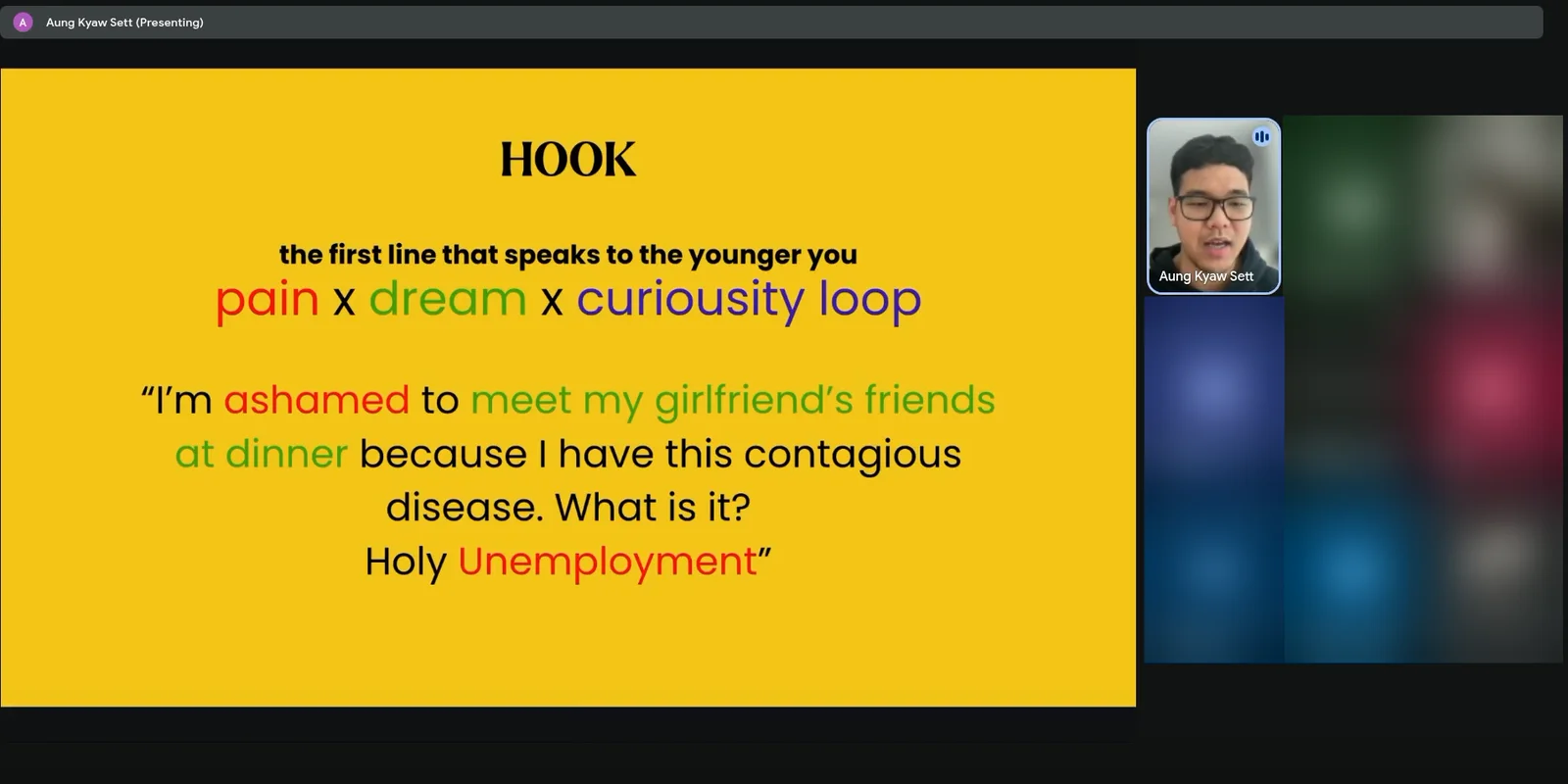
On a live call: every hook is pain × dream × curiosity loop, the first line that speaks to the younger you.

Sett presenting a slide on a live call: Hook, the first line that speaks to the younger you, pain × dream × curiosity loop, with an example hook. Members’ video tiles beside him, blurred.
  1. Physio clinic: 212 views before, 15.1K after, about 71 times more.

  2. Content creator: 245 views before, 57.6K after, about 235 times more.

He teaches · lesson 02 of 03

The script

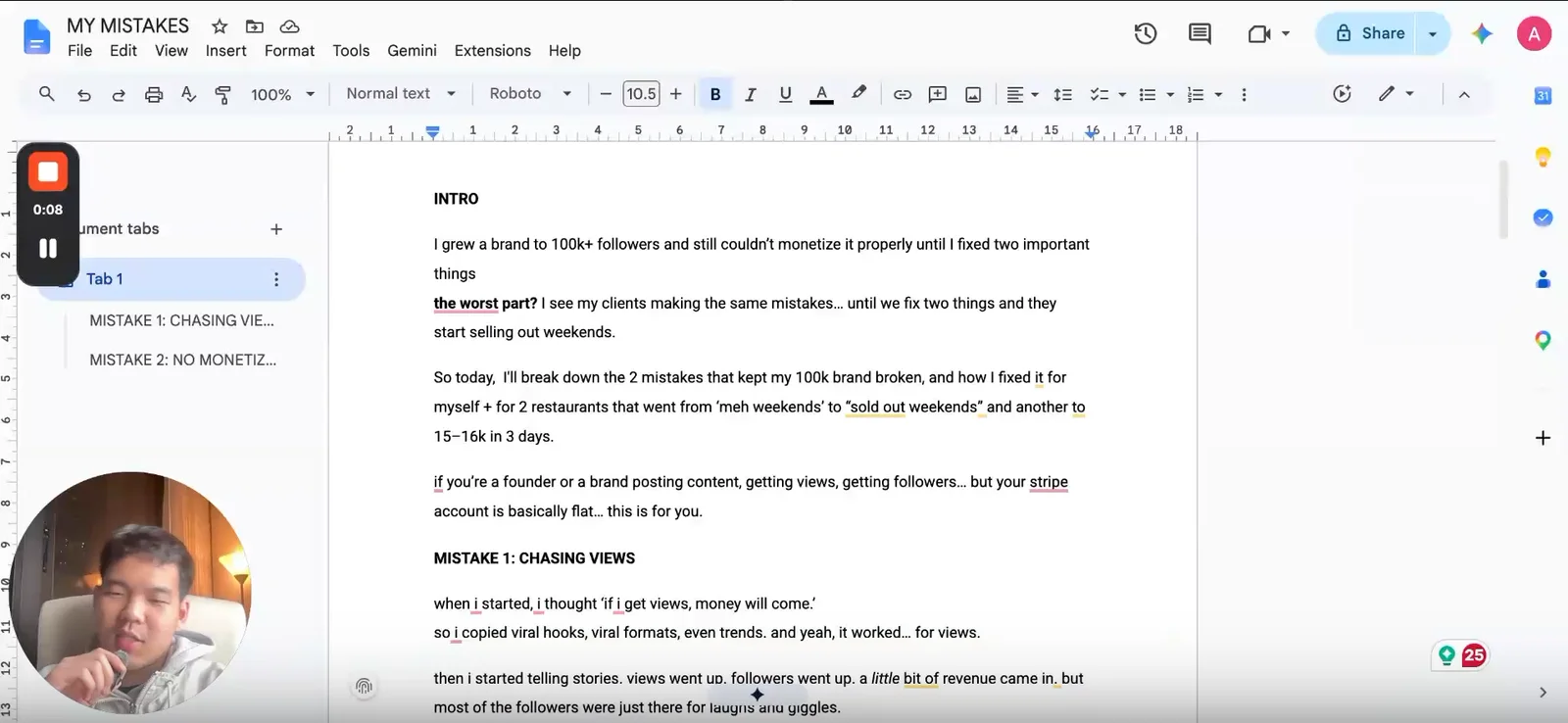
He opens his own scripts, mistakes included: the doc behind his 100K brand, line by line.

Sett on camera beside his own script document, My Mistakes: I grew a brand to 100k+ followers and still couldn’t monetize it properly until I fixed two important things.
  1. Entrepreneur: 536 views before, 78.4K after, about 146 times more.

  2. Japanese all-you-can-eat: 7,520 views before, 176K after, about 23 times more.

He teaches · lesson 03 of 03

The review

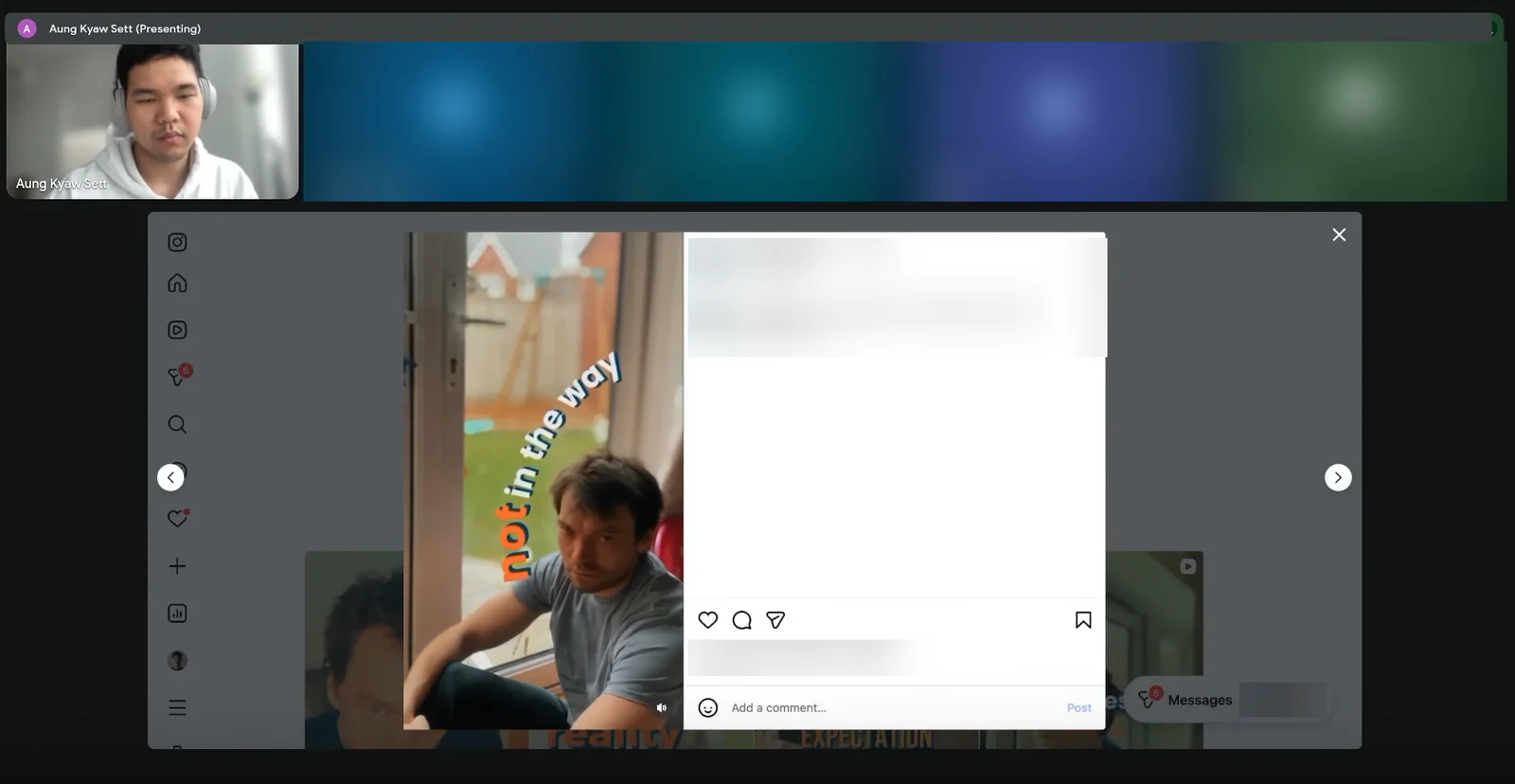
Members put their reels on the big screen; the whole call learns from the fix.

A member’s reel open on screen during Sett’s live call, reviewed together. Names blurred.
  1. Fitness: 14.8K views before, 510K after, about 34 times more.

  2. Restaurant: 16.7K views before, 1.3M after, about 78 times more.

To confirm Call screenshots from Sett’s Skool, other members blurred, consent to confirm. Reel covers and figures as Sett shows them in his Skool intro video; businesses not named. Each reel used the whole method; the pairing follows the order he teaches it. His community on Skool ↗

None of those were luck. Each one started as a story, a script and a shot list. That system is what the Academy teaches.

Inside Creatori Academy · the system behind those numbers

Six courses. One way of making content.

Course thumbnail: Onboarding. Sett smiles in a sunlit doorway, holding a notebook.

Course 01 / 06

Onboarding

  • How to succeed in the course
  • Where to find things
  • How to use things
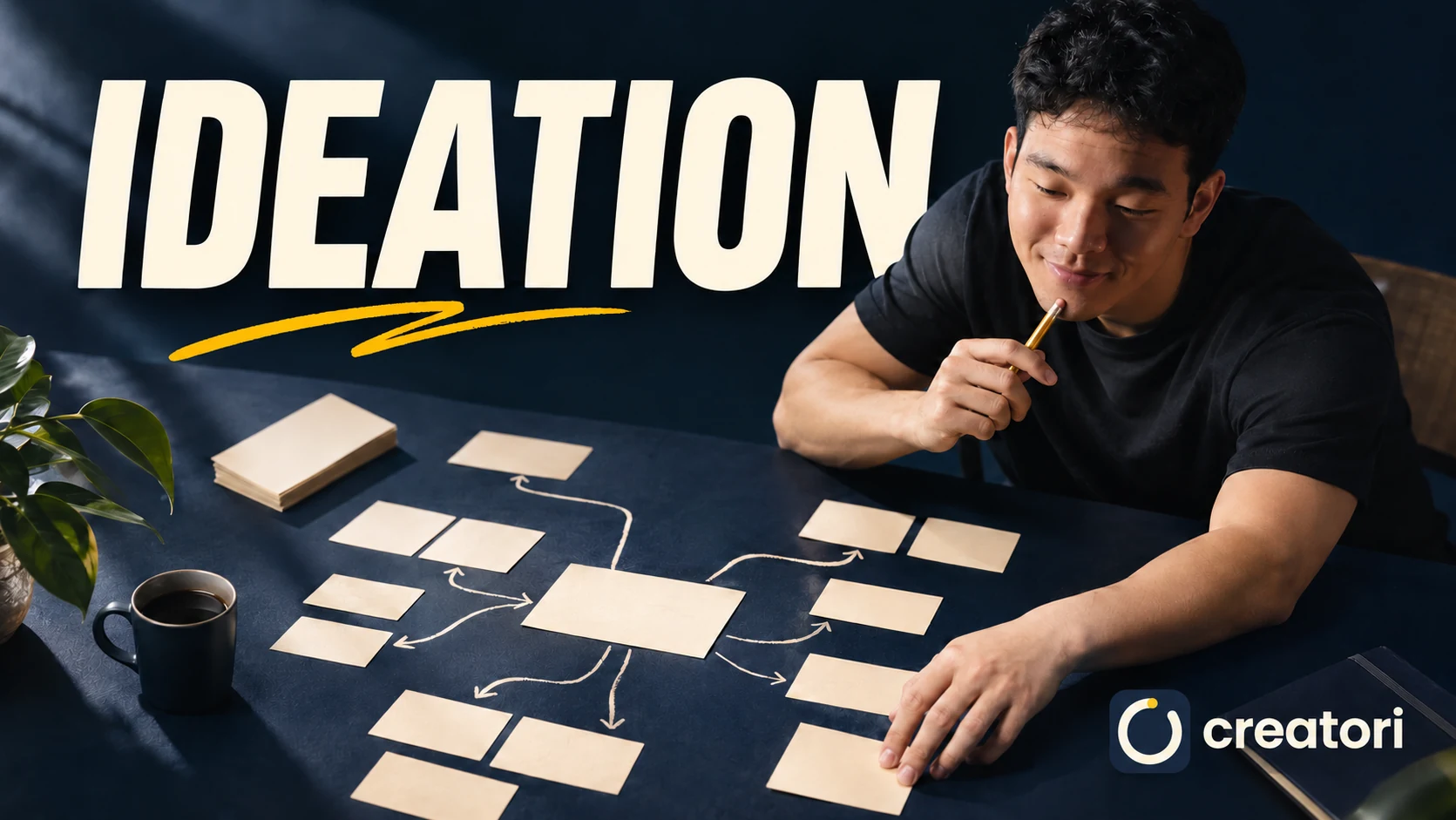
Course thumbnail: Ideation. Sett plans at a desk covered in connected idea cards.

Course 02 / 06

Ideation

  • How to come up with unlimited ideas
  • How to pick viral ideas
Course thumbnail: Content Pillars. Sett pins three coloured panels to a wall.

Course 03 / 06

Content Pillars

  • TOFU · top of funnel
  • MOFU · middle of funnel
  • BOFU · bottom of funnel
Course thumbnail: Content 101, script, film, edit. Sett sets up a cinema camera under studio lights.

Course 04 / 06

Content 101

  • Scripting
  • Filming
  • Editing
Course thumbnail: Carousel. Sett holds up a photo while a fan of printed slides spreads out.

Course 05 / 06 In development

Carousel

  • Lessons being written
Course thumbnail: Build your team. Sett talks a small team through a plan.

Course 06 / 06 In development

Build your team

  • How to train editors
  • How to train filmers
  • How to find editors

Learn something with Sett

Five free lessons. Pick one and try it on your business.

Each one is a public teaching post from Sett’s Instagram, not a recording from the Academy. Keep scrolling to move through them, press play on any lesson, then try the exercise.

0:00 / 0:56

01 Storytelling · 0:56

Why should anyone care?

An event only matters to people who know the struggle behind it. Sett uses a football star’s loss to show why your audience needs the backstory before the big moment.

Before you show the moment, show the struggle that gives it weight.

Try it this weekSuggested

Pick one ordinary moment from your business this week. Write two sentences about the struggle behind it, then one about why it matters now.

Watch on Sett’s Instagram
0:00 / 0:30

02 Scripting · 0:30

Say only your strongest lines

If talking to camera feels stiff, write the script first, say only the lines that hit hardest on camera, and carry the rest as voice-over to a song that matches the feeling.

Your two strongest lines go to camera. Everything else can be voice-over, spoken to the beat.

Try it this weekSuggested

Write your next script on a blank page. Highlight the two sentences that hit hardest and film only those to camera. Record the rest as voice-over, talking to the beat of one song.

Watch on Sett’s Instagram
0:00 / 0:27

03 Phone filming · 0:27

Cinematic shots on your phone

Shot size, depth and camera angle change how a scene feels. Sett films the same action long, medium and close, adds light behind or objects in front, and picks the angle for the emotion.

Mix long, medium and close shots. Choose the angle on purpose: high for vulnerability, low for authority, POV for personality.

Try it this weekSuggested

Film one action in your business three times: wide, medium and close. Then reshoot one of them with something in the foreground.

Watch on Sett’s Instagram

04 Shot reference · 9 slides

Eight shots and when to use them

A working vocabulary for your camera: what each shot is for, from long shots that set the place to POV shots that put the viewer in the scene, plus a tip for smooth transitions.

Every shot has a job. Name the job before you press record.

Try it this weekSuggested

Plan one scene from your business in three shots. For each one, write the shot and its job using Sett’s list, then film it.

Watch on Sett’s Instagram
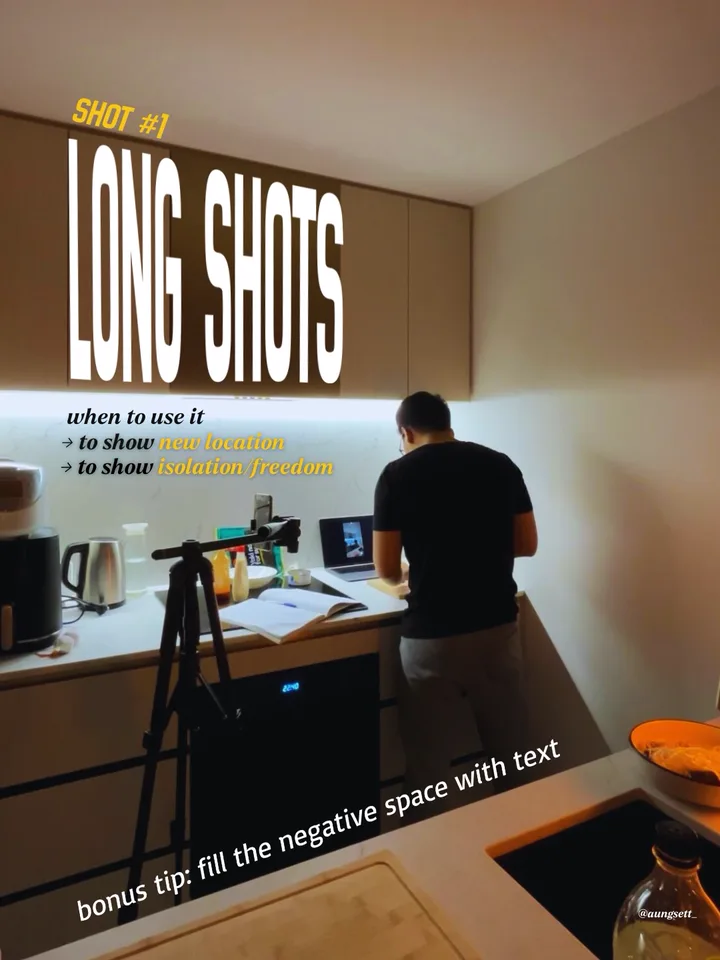
  1. Sett’s slide “Shot 1 · Long shots”. Sett cooks at the far end of his kitchen, small in the frame, with a phone on a tripod in the foreground.
    Shot 1 · Long shotsTo show a new location. To show isolation or freedom. Bonus tip: fill the negative space with text.
  2. Sett’s slide “Shot 2 · Medium shots”. Sett from the waist up, pointing at the camera across the kitchen bench.
    Shot 2 · Medium shotsTo show the action. To show interaction, such as talking, cooking or tutorials.
  3. Sett’s slide “Shot 3 · Close-up shots”. Sett’s face fills the frame, lips pursed, glasses catching the light.
    Shot 3 · Close-up shotsTo highlight details. To emphasise an emotion.
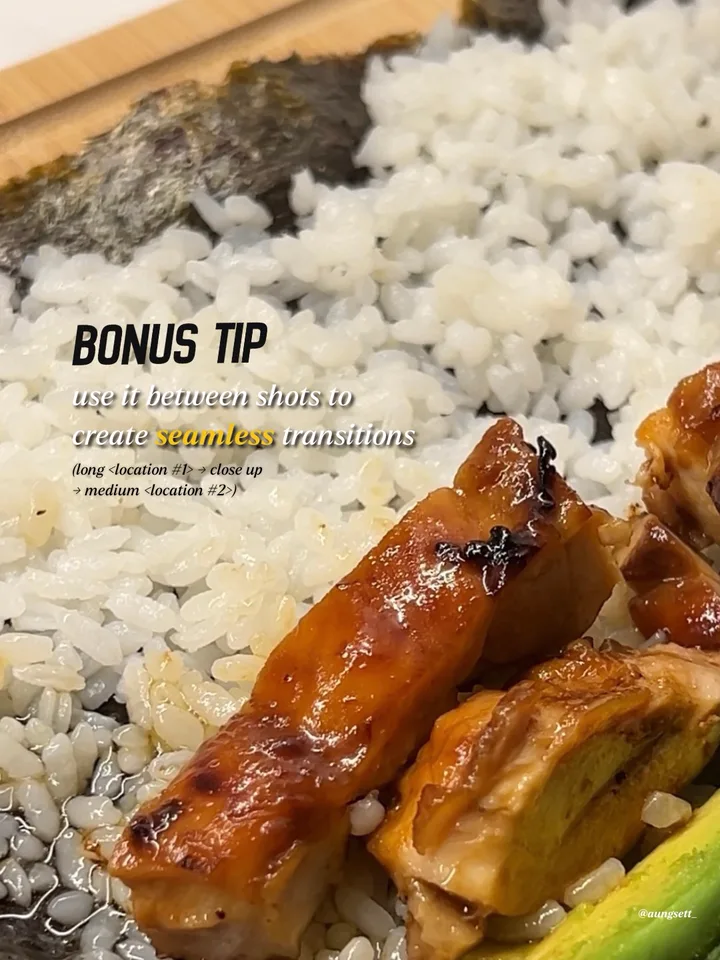
  4. Sett’s slide “Bonus tip · In-between shots”. A close-up of glazed chicken on sushi rice.
    Bonus tip · In-between shotsUse a detail between shots for seamless transitions: a long shot in one place, a close-up, then a medium shot somewhere else.
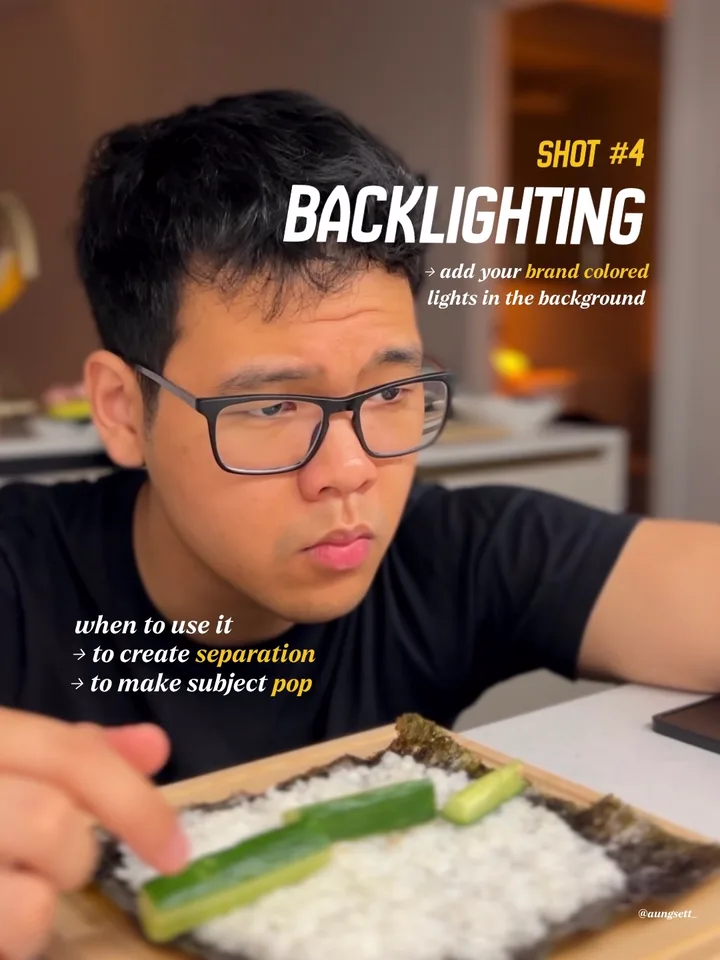
  5. Sett’s slide “Shot 4 · Backlighting”. Sett at the bench with warm lights glowing behind him.
    Shot 4 · BacklightingTo create separation. To make the subject pop. Add lights in your brand colours behind you.
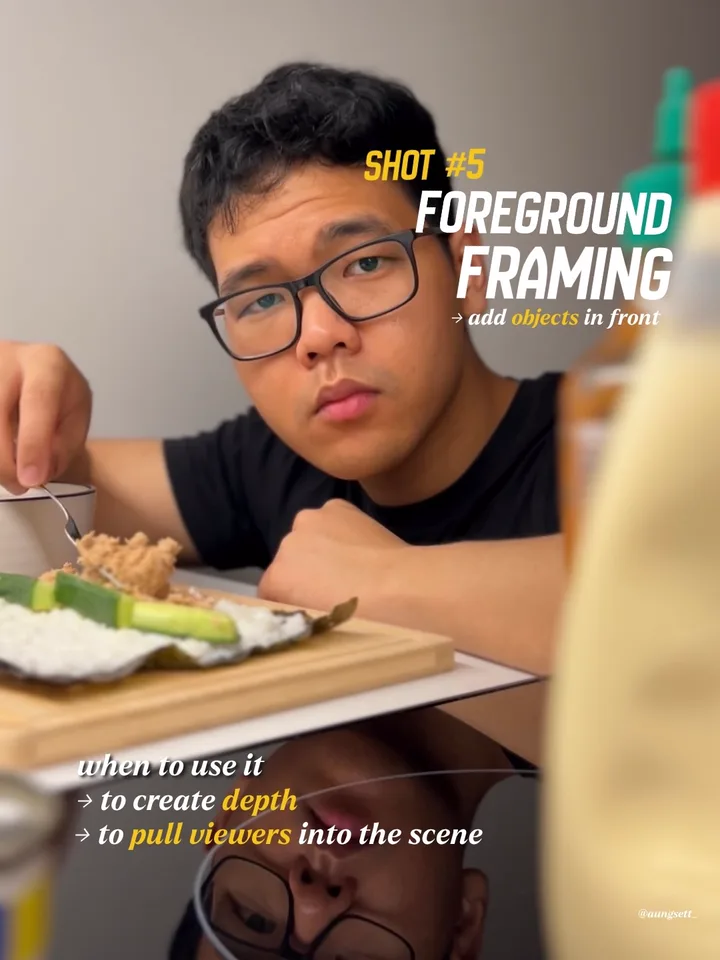
  6. Sett’s slide “Shot 5 · Foreground framing”. Sett seen past a blurred bottle in the foreground.
    Shot 5 · Foreground framingAdd objects in front. To create depth and pull viewers into the scene.
  7. Sett’s slide “Shot 6 · High angle shots”. The camera looks down at Sett, who looks up from a sushi board.
    Shot 6 · High angle shotsTo show vulnerability. To highlight struggle, fear or doubt.
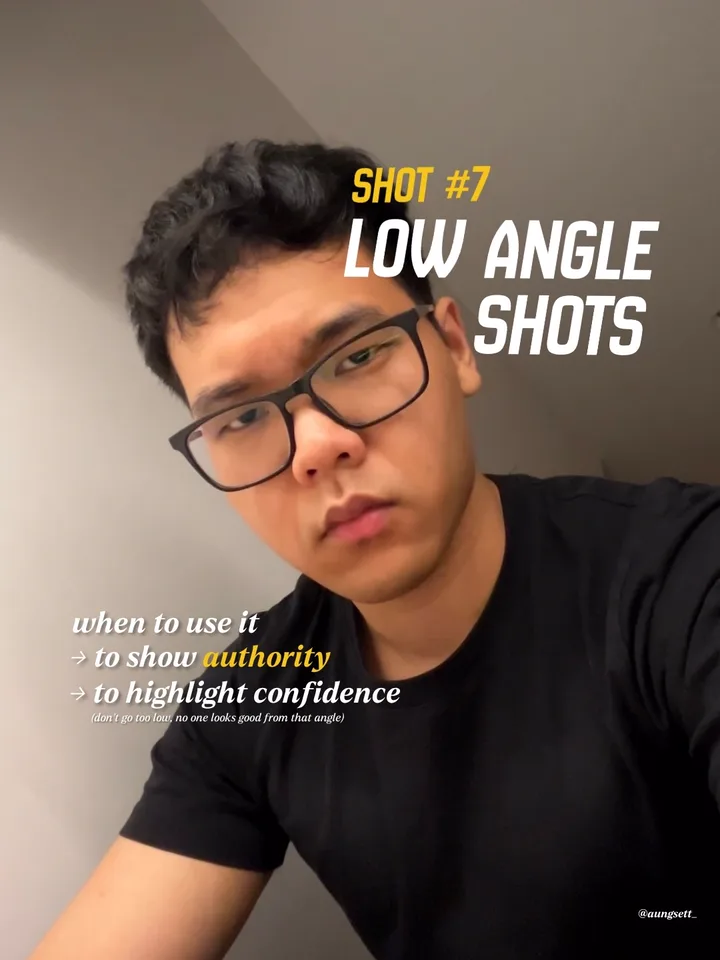
  8. Sett’s slide “Shot 7 · Low angle shots”. The camera looks up at Sett, who looks down into the lens.
    Shot 7 · Low angle shotsTo show authority. To highlight confidence. Don’t go too low.
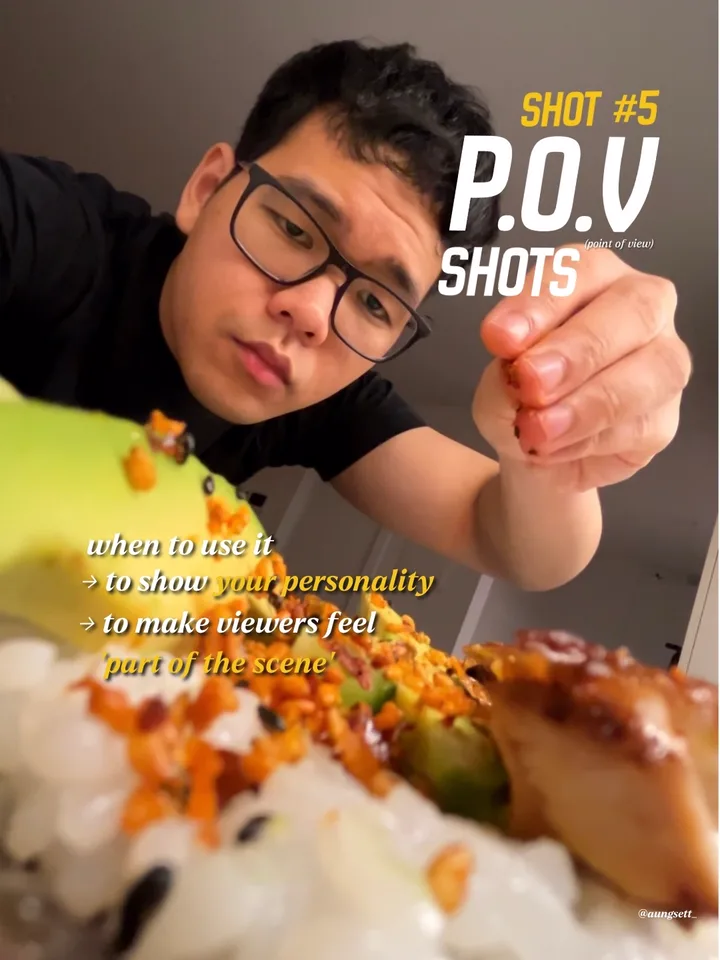
  9. Sett’s slide “Shot 8 · POV shots”. From the plate’s point of view, Sett sprinkles topping toward the lens.
    Shot 8 · POV shotsTo show your personality. To make viewers feel part of the scene.
0:00 / 0:30

05 Music and pacing · 0:30

Let the music carry the feeling

The same words land differently under different music. Sett talks through a low moment over a sad piano, then switches to an uplifting track where the story turns. Listen for the change at about 0:21.

Change the music where the story turns, and put your key line just after it.

Try it this weekSuggested

Cut 20 seconds of your own footage twice: once to a quiet track, once to a bright one. Mark where the feeling changes and place your turning line there.

Watch on Sett’s Instagram

Your instructor

Meet Sett.

Sett started a business and found that nobody could see it. So he learned to earn attention with a phone: which stories make people care, how to structure them, and who he was really talking to.

He stopped copying trends and started telling stories. Now he teaches that method to business owners and creators, first in free workshops and now in Creatori Academy. Bio to approve with Sett

  • Phoneis the camera he teaches with A phone, a budget tripod and a laptop to check the frame, in his phone-filming lesson.
  • 3 hrsfree founder workshop in Melbourne, June 2026 Business owners and creators practised on camera, to a beat. From his recap reel.
  • 5free lessons on this page Public teaching posts from his Instagram. His own story, in his words

Past workshop Melbourne, June 2026, from Sett’s recap reel.

“He’s given a structure of storytelling that you can make in a way that resonates with people.”

Workshop attendee, on camera Permission and name to confirm
Read the transcript

Sett: So in those three hours, we basically took creators and business owners who are stuck copying trends and figured out exactly what they should post for their brand, using their stories, so they can stand out from all the competition. And for those who were scared to talk on camera, we actually did an on-camera practice where everyone had to talk using the beat of the music. So on that day, everyone left with a clear structure and confidence on what video they should post next. And given the feedback that we had on that day, where everyone said…

Attendee: I now feel there’s much more clarity and structure with what to do.

Attendee: He’s given a structure of storytelling that you can make in a way that resonates with people.

Attendee: Content can be fun. It doesn’t have to be a chore.

Creatori Academy · six months with Sett

From an idea to a published episode, in four stages.

Each stage ends with something you make for your own business. Keep scrolling to move through the four stages.

6 months
of access from purchase
4 courses
Onboarding, Ideation, Content Pillars, Content 101. Two more in development.
Reviews
on your scripts, cuts and calls, at your plan’s pace
Workspace
AI-assisted, for writing your scripts

Stage 01 · Ideation · Content Pillars

Find a story in your business

Stories are actually meant to make people feel something.

Sett, storytelling lesson

Start with what only your business has: the person, the reason it exists, the struggle behind it. Show the struggle before the moment.

You make Assignment to confirm

A series idea and audience brief

Series Up before the city: a year of running a small bakery.

Who it’s for Neighbours who walk past every morning and have never come in.

The struggle Quitting a stable job to bake, and the first slow months.

Sample brief for a fictional bakery

Stage 02 · Content 101 → Scripting

Write an episode

Highlight the sentences that hit the hardest, because those are the only lines you’ll say on camera.

Sett, scripting lesson

Write it on a blank page, open on a problem people feel, then mark the lines that go to camera and the ones that become voice-over.

You make Assignment to confirm

A script with a hook and planned scenes

Hook “The first month, we sold eleven loaves. Total.”

To camera The hook, and “Now there’s a queue before we open.”

Voice-over The four lines in between, over B-roll, to one song.

Sample script plan

Stage 03 · Content 101 → Filming, Editing

Film and edit it

It’s not about the quality of the shots, because great storytelling needs intentional camera angles.

Sett, phone-filming lesson

Turn the script into a shot plan, film it on the phone you have, and cut a rough edit. Sett films on a budget tripod and checks the frame on his laptop.

You make Assignment to confirm

A rough cut made from a shot plan

Shot 1 Long shot: the kitchen lights come on in the dark. Sets the place.

Shot 2 Close-up: hands shaping dough. The detail.

Shot 3 Medium shot at the bench, to camera: the hook line.

Sample shot plan, using Sett’s shot list

Stage 04 · Reviews · workspace tools

Improve and publish

00:06Change the music here, where the story turns, then land your queue line.Sample note

Send the script or the cut for review. Notes land on the exact moment, you revise, publish, and plan the next episode with what you learned.

You make Assignment to confirm

A revised episode and a plan for the next one

Revised The music lifts at 0:06, just before “Now there’s a queue”.

Next episode The loaf that nearly closed the shop.

Sample revision and plan

Learn it, or have it made. Pick one.

Draft prices for this preview. US dollars. Names, amounts, tax and payment terms are confirmed before launch.

How production works

The method, in numbers Six client reels went from 40K to 2.1M views · 393K people follow Sett. See the reels Figures to confirm

Not sure yet? Start with the 5 free lessons: no sign-up, no card. Refund terms to confirm

Choose a plan

Selected Academy Standard · US$499

Both Academy plans include

    How reviews work

    Script reviews, video reviews and review calls share your plan’s review allowance. Messaging with the Creatori team is also included.

    Who reviews, turnaround times and whether unused reviews carry over are being confirmed.

    The courses

    • 01Onboarding
    • 02Ideation
    • 03Content Pillars
    • 04Content 101: Scripting, Filming, Editing
    • 05Carousel In development
    • 06Build your team In development

    What feedback looks like

    One note on a script. A clearer video before you film.

    In the Academy you send your own scripts and cuts for review. Here is what a review covers, and how a note changes a script.

    1. 01

      Script reviews

      Send the script before you film. The note marks the lines that land, the ones to cut, and what goes to camera.

    2. 02

      Video reviews

      Send the cut. Notes land on the exact moment, with what to change and why.

    3. 03

      Review calls

      Talk a script or a cut through together. Calls use the same allowance as written reviews.

    4. 04

      Messaging

      Questions between reviews go to the Creatori team, on both plans.

    Standard

    2→1

    Reviews:

    Intensive

    10/wk

    Reviews:

    Episode 1 · The first loaf

    Demonstration script · a small bakery

    1. Every morning at four, before anyone’s awake, I’m already here.Voice-over · B-roll: lights on in a dark kitchen
    2. Two years ago I left my office job to bake full time.Voice-over · B-roll: hands shaping dough
    3. The first month, we sold eleven loaves. Total.On camera · medium shot at the bench
    4. My mum said I’d be back at a desk by Christmas.Voice-over · B-roll: flour on the bench, close-up
    5. Now there’s a queue before we open.On camera · close-up, then cut to the queue
    6. This is the loaf that got us here.Voice-over · B-roll: the loaf breaking open

    All six lines planned to camera.

    Script noteDemonstration

    Highlight the two lines that hit hardest and say only those to camera. Put the rest under B-roll as voice-over, and talk to the beat of one song.

    Open · waiting on the revision

    The draft puts every line to camera, so the two strongest lines get lost.

    Demonstration. The script and the note were written for this preview to show how a review works. They aren’t from an Academy learner, and no learner results are shown on this page yet.

    Production

    Rather have the series made with you, or for you?

    Creatori can guide your team through production or make the series for you. Both start with an onboarding call and include a monthly performance review. Here’s who does what.

    Who does what
    StepDone With YouDone For You
    Plan the seriesTogether, with CreatoriCreatori
    ScriptsTo confirmCreatori · you review
    FilmingYou, with directionCreatori
    EditingTo confirmCreatori · you review the final video

    To confirm Who scripts and edits in Done With You, who edits in Done For You, availability and who answers inquiries.

    Before you start

    Do I need any filming or editing experience?

    The Academy is written for business owners and small teams who make content inconsistently, so it starts from finding the story.

    Prerequisites to confirm with Sett.

    What equipment do I need?

    Sett teaches filming with a phone. In his phone-filming lesson he uses a budget tripod and connects the phone to a laptop so he can check the frame while he films.

    The minimum kit list is being confirmed.

    How much time does it take?

    Typical weekly effort and what a first project involves are being confirmed with Sett.

    Are the free lessons from the Academy?

    No. They’re public teaching posts from Sett’s Instagram. The Academy adds structured courses in order, a script workspace, and reviews of your own scripts and videos.

    How long do I have access?

    Six months from the day you buy, on either plan. Both plans include the same courses and tools.

    How does the review allowance work?

    Script reviews, video reviews and review calls share your plan’s review allowance. Standard gives you two in your first month, then one a month for the next five. Intensive gives you ten a week. Messaging with the Creatori team is included on both plans.

    Who reviews and turnaround times are being confirmed.

    How do I get support?

    Messaging with the Creatori team is included on both plans.

    The support address and hours are still needed.

    What about taxes, refunds and currency?

    These terms are being finalised and will be published before enrolment opens.

    That’s a wrap

    Start with a free lesson, learn the whole process in the Academy, or have Creatori make the series with you.

    Six courses · six months · from US$499
    Reviews of your own work, every month

    Preview of the next step

    Enrol in Academy Standard

    This preview collects nothing. At launch, this step goes to checkout.

    offer_id · placement